

Most of a strength coach's week does not go to coaching. It goes to rebuilding templates, retyping last year's spreadsheet, pulling testing numbers into something a sport coach will actually read, and adjusting workouts every time an athlete tweaks a hamstring or a road trip moves the schedule. That work matters, but it is execution, and it pulls hours away from the floor.
Flex is FYTT's intelligent coaching assistant, and it exists to take that execution work off your plate. It takes your training principles, your athlete data, and your house style and acts on them inside FYTT. You tell Flex what you want in plain language, and it does the work on your team's real records: programs, plans, the calendar, reports, tests, the library, and Automations. You review every output, adjust what does not fit, and own the result. The short version is simple: you define how you train, Flex does the work, and you coach.
How you work with Flex
Flex is available to every coach in the desktop coaching app. Open it from the Flex button beside search or with Command-period (Ctrl+period on Windows), and the panel stays open as you move around the app. Pages like the training library, plans, reports, groups, metrics, the calendar, and the program builder have a With Flex button that starts Flex with that record attached, and the weekly brief on your team dashboard opens Flex with the question already asked.

Flex is built so the calls stay yours. Anything new it builds carries a Draft badge and cannot be assigned or enrolled until you save it. Its replies include undo links, and undo asks you to confirm first and warns you if someone has edited that record since. Flex works on one task at a time per conversation, and it holds edits to the program, plan, or block it is working on until it finishes, so nothing changes under you mid-task.
Flex does six jobs.
1. Build
Tell Flex your sport, your block length, and your priorities, and it drafts a multi-week program with progressions and block-level detail, including exercise modifiers for athlete-specific substitutions. It can lay out a long-term plan across the phases of a season, build standalone blocks and full library workouts, and enroll athletes and place sessions on their calendars once you are ready. Everything it builds arrives as a draft you review, adjust, and save.

2. Convert
Years of programming live in spreadsheets, PDFs, and photos of whiteboards. Upload an Excel file, a CSV, a PDF, or an image, or paste a program in as text, and Flex reads the structure, matches the exercises and progressions, and converts it into a FYTT program you can reuse.

3. Adjust
Injuries, missed weeks, and travel are part of every season. Tell Flex what changed, such as "cut Jane's volume 10% next week," "have Sam do air squats instead of deadlifts today," or "move Thursday's lift to Friday," and Flex changes the scheduled sessions for that athlete or group. It can scale volume, swap an exercise for one athlete, move or remove sessions, and edit shared blocks for a group. Flex keeps adjustments conservative and avoids changes larger than 20% unless you ask for more, and logged work and past sessions are protected. If you undo, moved and removed sessions go back and sessions Flex added are taken away, unless an athlete has already logged them or the day has passed.

4. Analyze and report
Ask the questions your data can answer. Flex reads workouts, attendance, metrics, surveys, notes, and injuries, and calculates trends, ACWR, and cohort comparisons for an athlete or a group. It summarizes survey answers and points out patterns worth a second look, such as an athlete giving the same answers day after day, and it builds one-off charts and saved group or athlete reports.
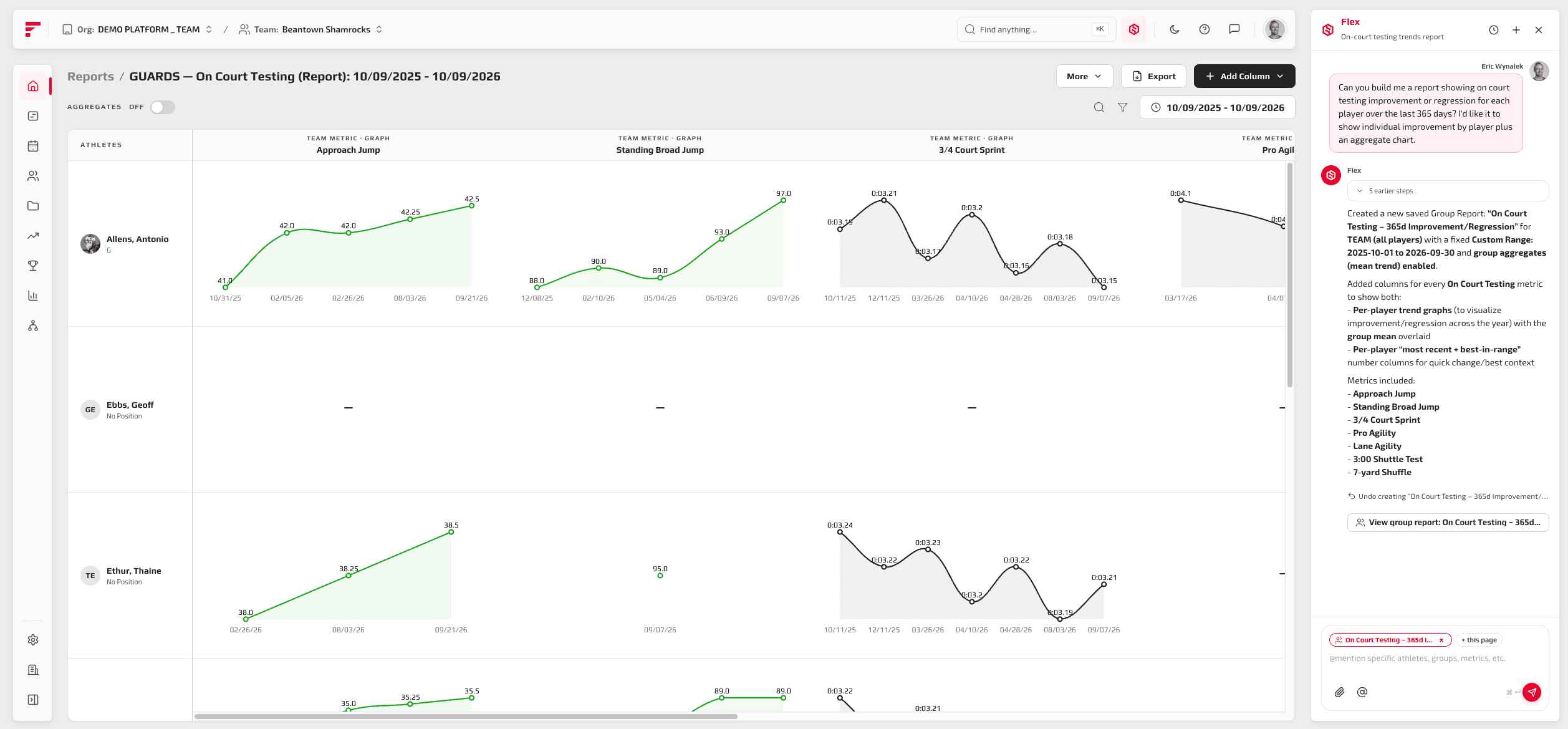
Flex also builds and edits leaderboards. Describe the metrics, groups, and date range you want to rank, and the board can go up on the weight room TV in TV mode. Before ranking body weight or body composition, Flex asks you first. Flex reports what your data shows, and the read on what it means stays with you.

5. Automate
You decide the rules: the triggers, the thresholds, and what should happen when an athlete tests above or below them. Describe a rule the way you would explain it to a GA, such as moving athletes who fall below a jump height threshold into a regression group, and Flex builds the FYTT Automation from the triggers and actions you described. It opens as a draft you save, new Automations start inactive, and See who goes where shows each athlete's route and why before you turn it on. For calls that do not fit a clean threshold, an Automation can include a Flex decision: you write the context and plain-language criteria for each route, and Flex reads the athlete's data and picks the route that fits. A Flex action works the same way, carrying out the instructions you write when an athlete reaches it. From then on, your rules are applied to every athlete, every time, without you making each routing call by hand.

6. Administer
Flex handles the setup and housekeeping that eats a staff's week. It defines metrics, assessments, and surveys, records test results, creates groups, and adds athlete notes. It keeps the exercise library clean by adding exercises, writing descriptions, tagging them, and finding duplicates, and it creates, applies, merges, and deletes tags. Because deleting an exercise or merging duplicates is permanent, Flex asks you to confirm first.

Your style: save how you program once
Every staff has conventions, such as "we always start with a warm-up" or "we use RPE, never percentages." Tell Flex once, and every program, plan, and workout it builds follows them. Flex can also read your existing programs and suggest conventions, and you approve each one before it is saved. That is the clearest proof of how Flex works: it acts on your methodology, and you own the methodology.
Your methodology, executed
Flex does not replace the judgment that makes you a coach. It removes the hours between deciding what an athlete needs and having that decision built, scheduled, and tracked, and everything new it builds is a draft you own. Your team's data is never mixed with another institution's.
Want to learn more? Email us at team@fytt.io or book time to see a demo!